


Discover effective phishing prevention strategies that go beyond filters. Learn how to protect against business email compromise.

November 25, 2026
Technical filtering alone cannot stop business email compromise because these attacks often contain no links or attachments for filters to catch. Attackers exploit trust and bypass automated defenses, reaching employees directly.
Email filters work by scanning incoming messages for known danger signals: suspicious links, infected attachments, flagged senders. That scanning catches traditional phishing because traditional phishing needs those signals to work. Business email compromise needs none of them, so it passes through the same filter untouched.
That gap matters because the message itself looks ordinary. A request to transfer funds or share a file, worded the way a busy executive might word it, carries no payload for a filter to flag. The only thing wrong with it is a fact no scanner can check: it was never sent by the person it claims to be from. Losses from business email compromise have climbed past $1.8 billion in a single year, a figure that reflects exactly how often that gap gets exploited.
So the weakness isn't in the filter's design; it's in what filters were built to look for in the first place. Closing that gap starts with understanding how it opens.

Technical filters do one job well: they scan incoming mail for suspicious links, attachments, and known malicious patterns, catching most traditional phishing before it reaches an inbox.
Business email compromise sidesteps that job entirely. There's no link to flag and no attachment to quarantine, only a request that reads like routine business, often appearing to come from a trusted executive asking for a wire transfer or a sensitive file.
Because none of the usual red flags are present, the filter has nothing to catch, and the message lands straight in an employee's inbox as if it had been cleared. That's precisely what makes BEC so effective: it bypasses the system by never giving the system a reason to react, aiming instead at the judgment of the person reading it.
That person, in turn, is the real point of exposure. An urgent-sounding request from someone in authority rarely gets the scrutiny it needs, and attackers are counting on exactly that reaction. Treating filters as sufficient on their own, then, builds a confidence the defenses haven't actually earned.
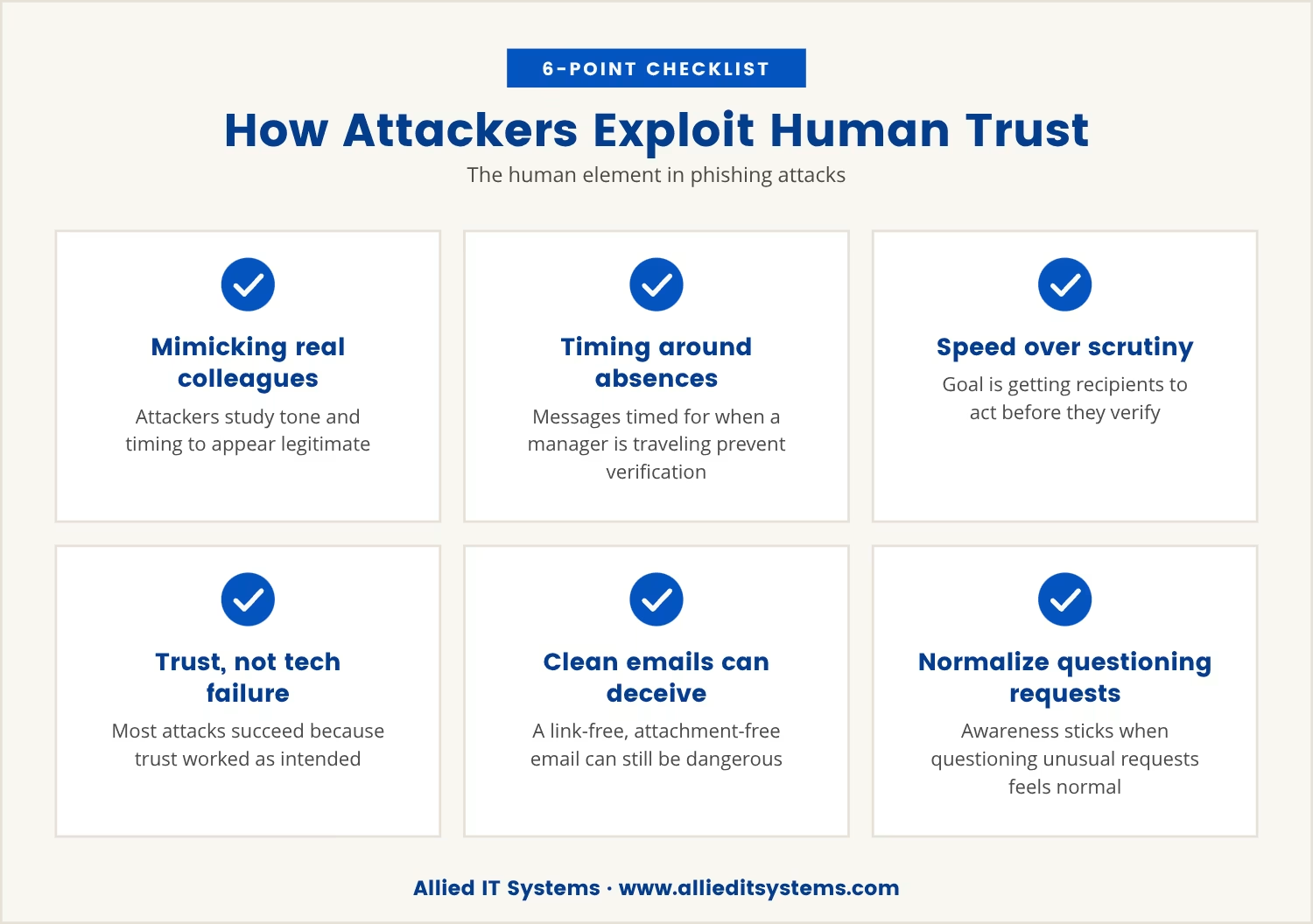
Technology stops where human behavior starts, and attackers build their messages around that boundary. They study how real colleagues write, copy that tone, and time their messages for maximum effect.
A spear phishing email timed for when the real manager is traveling, for instance, leaves staff with no easy way to check the request before acting on it. The goal is speed: get the recipient moving before they stop to verify anything. Most of these attacks succeed for that reason alone, not because a technical safeguard failed but because trust did what it was designed to do.
Recognizing obvious scams isn't enough preparation on its own; employees also need to understand that a clean-looking email, free of links or attachments, can still be the dangerous one. That awareness only sticks in a workplace where questioning an unusual request is treated as normal, not as an overreaction.
When was the last time your team reviewed how to handle a request for sensitive information that looks legitimate but feels off?
Because no single safeguard closes the BEC gap, effective phishing prevention has to work in layers. Texas businesses, facing the same wide range of cyber threats as anywhere else, need technology and human judgment reinforcing each other rather than one standing in for the other.
That starts with the email security setup already in place: filters kept current and tuned to catch common threats. From there, regular training built around business email compromise and realistic scenarios extends the defense to the point filters can't reach.
Verification habits matter just as much. Encouraging employees to confirm any request for money or sensitive data by calling the sender on a known number rather than replying to the email stops a convincing message before it becomes a costly one. Pairing that habit with an easy, fast way to report suspicious messages means a near-miss gets caught instead of ignored.
None of this holds still, though. Attackers adjust their methods as defenses catch up, so what stopped last year's attempts may not stop this year's, and reviewing those defenses on a regular basis is what keeps pace with the shift.

Several specific techniques let attackers slip past the filters described above, and recognizing each one is what makes a layered defense possible.
Attackers copy the email addresses and writing style of executives or familiar business partners. The resemblance is what makes the message read as authentic.
Skipping links and attachments entirely removes the signals most filters are built to catch. A plain-text request simply has nothing for the scanner to flag.
A message that sounds urgent or appears to come from someone senior pushes the reader toward quick action. That pressure is designed to crowd out verification.
Details pulled from social media or a company website let an attacker get specifics right. Those specifics are what make the forged message feel credible.
Finance and HR staff handle the kinds of requests attackers want fulfilled, which is exactly why those roles get targeted more often. The payoff for a successful attempt is simply higher there.
Tactics shift constantly, so a pattern a filter learned to catch last month may already be retired. That constant tweaking is what keeps technical systems a step behind.
Even where the technical tools are solid, certain patterns in how a business operates signal that a phishing attempt is more likely to succeed.
Fixing these gaps takes more than new tools; it takes a workplace where everyone understands their own part in stopping an attack before it lands.
That starts by folding awareness into the regular routine rather than treating it as a once-a-year event. Short, frequent sessions tend to stick better than long ones, especially when they walk through real examples of phishing messages rather than abstract warnings.
Open communication matters just as much as the training itself. An employee who spots something suspicious should feel comfortable flagging it without worrying about blame, and recognizing the people who do catch something reinforces that the habit is valued, not just tolerated.
Leadership sets the tone for all of it. When managers visibly treat cybersecurity as a priority, employees follow that lead, and that alignment is what actually lowers the odds of a phishing attack reaching sensitive information.
Filters remain a necessary piece of the setup, but business email compromise proves they were never built to catch every threat, since a well-crafted message can reach an employee without tripping a single alert.
For a Texas business leaning on filtering alone, that gap is a clear path straight to the inbox. Pairing the technology with ongoing training and firm verification policies is what actually closes it and cuts the risk of a resulting data breach.

Many companies with 15 to 70 users trust email filters to protect them, but attackers know how to get around these defenses. At Allied IT Systems, we understand that a single convincing message can bypass even the best technical tools.
We invite you to see how we approach phishing prevention by combining technology with practical, people-focused strategies. Let’s talk about what would make your setup safer.
If you find a lower price for the same level of service anywhere else, we’ll match it—no negotiation required.
[.mspl-button-text]Request a price match[.mspl-button-text]
Watch for unusual requests, a shift in the sender's normal communication style, or unexpected urgency. Even a normal-looking email deserves a second check if it asks for money or sensitive information unexpectedly.
Report it right away to IT or the designated security contact, and avoid replying to the email or acting on its request until someone has verified it. Fast reporting is what limits the damage.
Finance and HR staff typically control sensitive data and have the authority to approve payments, which makes them more valuable targets and raises the odds of a successful attack.
Regular employee training, a clear reporting procedure, and a habit of verifying unusual requests form a solid layered defense. These practices scale down well, so even a small business benefits from applying all three together.
Review strategies at least every six months, and sooner if a new phishing technique comes to light. Staying ahead of evolving threats depends on treating that review as routine, not optional.

Tommy Fauth is a technology and cybersecurity executive with over 20 years of experience in enterprise IT, managed services, infrastructure, and regulatory compliance. A Marine Corps veteran, he helps organizations improve security, reliability, and business performance through practical technology leadership.